What is the Hypermedia Authentication API?
On this page
OAuth and OpenID Connect have provided the industry with solid standards to implement Authentication and Authorization. Both standards are battle-tested and implemented across a vast number of websites and applications. Part of their success is the strong emphasis put on security. In particular, the Code Flow provides vetted security and a high level of flexibility, to authenticate users in many ways with only simple application code.
Thanks to the use of a browser and HTTP redirect mechanisms, the flows can remain secure from a number of threats. For example, when dealing with third party apps users don't have to enter their credentials directly in the app - in the browser they are redirected to the external authentication website. Using browser redirects also helps to mitigate attacks on the contents of the response.
Browser Limitations
The use of a browser in OAuth and OpenID Connect flows can sometimes become a burden that works against application architectures. In recent years we've been steering away from traditional web-based apps to single page applications (SPA) and, more importantly, mobile apps.
In those environments, the necessity of using a browser during the authentication flow can pose some problems. The app needs to have capabilities to both open the browser and capture the redirect response, which can be especially problematic for desktop applications, due to the use of two disconnected windows during user logins. Another potential limitation is that the browser cannot directly integrate with native device features to authenticate users.
Having to open the browser additionally impacts user experience - the user has to leave the original app to go to the browser. The need for redirects is also problematic for single page applications, which generally do not reload the whole page. Some SPAs use iframes to complete OAuth flows to avoid page reloading, but this needs support for third-party cookies in the browser - a feature which is no longer reliable due to browser cookie restrictions.
What can further impact user experience is the fact that it is the Authorization Server, not the client, that maintains the look and feel of the authentication process. This can sometimes lead to friction between product teams and your identity team.
Resource Owner Password Credentials (ROPC)
One approach to bypass the browser is to use the Resource Owner Password Flow (ROPC). Although using this flow resolves some user experience problems, and can be helpful in applications which cannot handle a redirect response from the Authorization Server, it has many security drawbacks.
The ROPC flow is limited to only username and passwords stored by the given Authorization Server. It's not possible to use any external authenticators. In particular, it's not possible to implement Strong Customer Authentication (SCA) solutions, like Multi-Factor Authentication (MFA).
Moreover, enabling ROPC without additional client attestation can lead to serious security risks. It is then quite easy to impersonate the OAuth client and take advantage of the password flow, which can lead to the leakage of user passwords. Therefore, you should never use the password flow.
What is User Authentication?
These days, authentication is a complex state machine, which moves the user from one step to another, trying to establish their identity. For example, you might allow your users to authenticate with either their password or a linked social media account. But if they authenticate using a social media account you want them to confirm the authentication with a second factor - a one-time code sent to their mobile device. What is more, you don't want them to authenticate with the social media account, if they are signing in from an unusual and possibly malicious location.
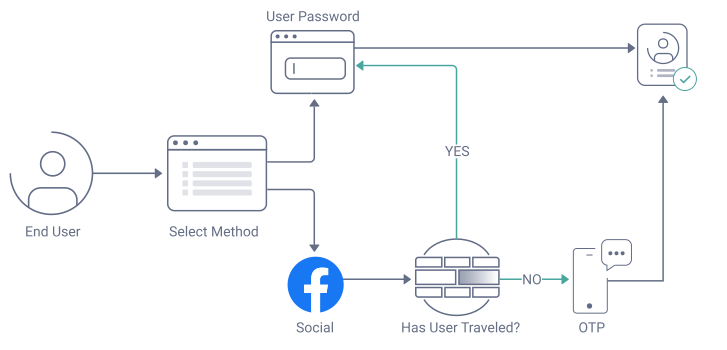
As you can see, user authentication is not static. You also need to authenticate users when they sign up to your digital services, or when they need to recover their account. Different sets of users have distinct requirements. Employees, like those from a business partner, may need to sign in with their corporate identity provider (IdP). Newer authentication methods appear, which may have stronger security or a better user experience. You may also want to allow users to choose their preferred authentication factor(s).
How OAuth User Authentication Works
In traditional OAuth architectures, the Authorization Server typically receives and validates an authorization request, then sets a cookie and begins an authentication flow. The Authorization Server redirects the user through a series of login screens, each of which requires the authentication cookie and triggers a browser page reload.
Flow with traditional OAuth:
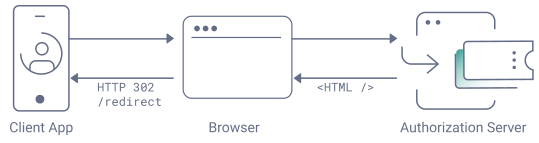
In effect, the Authorization Server behaves like a traditional website, that is disconnected from SPAs and mobile apps, and uses a different architecture. Server side processing results in the download of HTML, CSS and JavaScript to the browser. Authorization Server providers enable varying levels of customization, and web developers typically need to work with website technologies to brand their login screens.
What the Hypermedia Authentication API Enables
The Hypermedia Authentication API (HAAPI) is an API-driven implementation of the code flow that Curity provides. It continues to provide all of the essential security and flexibility of the code flow, but applications also get the following usability and security benefits.
- Use browserless flows to improve login user experiences.
- Single page applications use SPA technology for login screens.
- Mobile and desktop applications use native technology for login screens.
- Mobile and desktop applications can use additional native authentication methods.
- Mobile applications use attestation to prevent client impersonation and protect refresh tokens.
- Frontend teams can customize login screens without depending on an identity team.
How API-Driven User Authentication Works
In a HAAPI code flow, clients interact directly with the Authorization Server's hypermedia API, without the need of an intermediary user-agent. The overall security still adheres to the flows standardised by OAuth and OpenID Connect frameworks. The API returns JSON hypermedia responses that the client renders as login screens. The client can directly implement its own login user experience customizations.
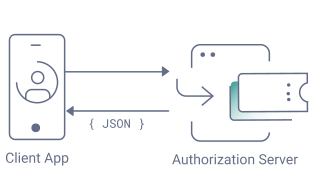
The client first attests its identity at the Authorization Server and then sends an authorization request to start a code flow. The Authorization Server receives and validates an authorization request, and then issues an authentication access token (AAT). The API returns a series of JSON hypermedia responses with form representations and actions that instruct the client which API endpoint to call next. The client renders a series of login screens that the user interacts with. Every API request from the client is protected by the AAT, in a similar way to how cookies protect traditional login screens.
Client integrations with hypermedia responses and dynamic rendering of forms with good styling and reliability is non-trivial. To reduce work, the Authorization Server should provide SDKs with a default implementation that product teams can customize. Single page application teams can use a familiar technology, like React, to implement customizations, and could even deploy login screens to a Content Delivery Network (CDN). Similarly, mobile developers can implement their own customizations, e.g. in Kotlin or Swift, and bundle results into their mobile app.
The Authorization Server continues to control the flow of the authentication process, and an identity team can continue to use the Authorization Server to dictate security. The identity team can also use plugins to extend the Authorization Server, for example to implement custom authentication methods and deliver HAAPI JSON representations for custom forms. Frontend teams can then style custom login screens in the same way that they style built-in login screens. If the identity team makes Authorization Server changes that result in new login screens, client SDKs respond dynamically without requiring code changes.
SPA Login Experiences
For any HAAPI OAuth client, the Authorization Server can provide an out-of-the-box SPA for logins. Clients can start a traditional browser-based flow but use a configuration setting that activates HAAPI logins. After the Authorization Server processes the initial authorization request from the client, it switches to SPA mode.
Web developers from application teams can continue to own a login SPA but without any code impact on their applications. During web customizations, developers can use modern web tools and technologies. For example, they can customize login screens using TypeScript code, use CSS frameworks for effects and animations, and use techniques like live reloading for fast feedback in the browser.
Watch the following overview video and check out the HAAPI React App for further details.

What About Security?
Curity's Hypermedia Authentication API is designed to enable clients to overcome OAuth and OpenID Connect browser login limitations, but to maintain at least the same level of security as when the browser is in use.
Curity has developed a framework to guarantee the identity of the OAuth client using attestation mechanisms, to prevent impersonation by malicious clients. What is more, authentication access tokens are sender-constrained to protect against malicious authentication API requests or misuse of stolen refresh tokens. The HAAPI Mobile Security Lifecycle tutorial walks through a HAAPI flow for a mobile client, to effectively upgrade it to the security level of a confidential client.
HAAPI is not entirely browserless and aligns with the draft specification on OAuth 2.0 for First-Party Applications. HAAPI flows continue to open the browser when it is the security best practice. For example, when a user signs in with an external identity provider, the Authorization Server should always open a browser, to prevent the OAuth client from potentially coming into contact with third-party passwords.
For a deep dive into HAAPI security, and to gain a complete understanding of mechanisms like client attestation and sender-constrained tokens, check out the Hypermedia Authentication API Security in Detail whitepaper.
Conclusion
The Hypermedia Authentication API enables you to improve login user experiences in ways that align with modern application architectures and team development processes. It enables you to create a seamless experience for your users without compromizing security. In fact, for some types of OAuth clients, you can significantly harden security. At the same time you do not lose the flexibility or security of traditional authentication flows, and your identity team continues to control policies.


Michal Trojanowski
Product Marketing Engineer at Curity
Customer Stories
Learn how organizations run identity and API security at scale.
Read customer storiesWas this helpful?